FAQs: Developer & Integration

Find answers to common questions about Click4Assistance, including our live chat software, AI-powered customer support platform, security, pricing, integrations, onboarding, and support.

Customer service agent using Click4Assistance to configure website integrations, API connections, and customer support platform settings

Knowledge Articles for Integration & API

Find answers to frequently asked questions about implementing Click4Assistance on your website, including setup, configuration, deployment, customisation, website requirements, user experience, security, and extending customer engagement across digital channels.

How is Click4Assistance added to a website?

Click4Assistance is designed for straightforward implementation into existing websites.

In most deployments, the platform is added by including a small JavaScript snippet within the website. Once installed, administrators can configure the customer experience without requiring further website development.

This approach allows organisations to introduce Live Chat, AI Agents and Chatbots while maintaining their existing website and content management system.

Can Click4Assistance be added to any website?

Yes.

The platform is designed to integrate with virtually any modern website, regardless of the underlying technology or Content Management System (CMS).

Examples include:

  • WordPress.
  • Umbraco.
  • Sitecore.
  • Kentico.
  • Drupal.
  • Joomla.
  • Shopify.
  • Magento.
  • Bespoke websites.

Implementation requirements may vary depending on the website architecture and security policies.

Does implementing Click4Assistance require a website redesign?

No.

The platform is designed to complement an existing website rather than replace it.

Most organisations can introduce customer engagement features without redesigning their website or changing their existing content management processes.

Can Live Chat be embedded within a webpage?

Yes.

In addition to the traditional floating chat launcher, Live Chat and AI Agents can be embedded directly into a webpage.

This enables organisations to create more conversational digital experiences where assistance becomes part of the page rather than a separate pop-up window.

This approach is particularly effective for customer portals, product pages and support centres.

What is a Conversational Website?

A Conversational Website combines traditional web content with AI-powered interaction, allowing visitors to ask questions, complete tasks and receive personalised assistance without navigating through multiple pages.

Rather than replacing a website, conversational experiences enhance it by making information easier to access through natural language.

Click4Assistance enables organisations to embed AI directly into existing websites while connecting with business systems where appropriate.

Can different pages use different AI Agents?

Yes.

Different sections of a website can use AI Agents trained on knowledge relevant to that audience or service.

Examples include:

  • Sales pages.
  • Customer Support.
  • Broker Portal.
  • Student Admissions.
  • Housing Repairs.
  • HR Portal.

This enables organisations to deliver focused, context-aware conversational experiences.

Can AI be embedded into customer portals?

Yes.

AI can be integrated into secure customer portals to assist users with account management, service requests, documentation and frequently asked questions.

Where authorised integrations exist, AI can also interact with business systems to support personalised customer journeys.

Can AI be embedded into intranets?

Yes.

Many organisations deploy AI within internal intranets to help employees locate information, access policies, retrieve procedures and answer operational questions.

Internal AI can improve productivity by reducing the time employees spend searching for organisational knowledge.

Can organisations customise the embedded experience?

Yes.

Embedded experiences can be configured to reflect an organisation's branding, user journeys and operational requirements.

Examples include:

  • Corporate branding.
  • Welcome messages.
  • Position within the page.
  • AI Agent selection.
  • Surveys.
  • Escalation behaviour.
  • Department routing.

This flexibility enables organisations to create conversational experiences that integrate naturally into their existing digital services.

Can Click4Assistance integrate with existing customer journeys?

Yes.

The platform is designed to enhance existing digital journeys rather than replace them.

Examples include:

  • Quotation requests.
  • Insurance applications.
  • Student admissions.
  • Housing repairs.
  • Appointment booking.
  • Customer authentication.
  • Product selection.
  • Technical support.

AI Agents can provide guidance throughout these journeys while connecting with existing business processes where appropriate.

Does embedded AI improve customer engagement?

Embedding AI within the content of a webpage allows customers to ask questions at the point they need assistance, reducing the need to search across multiple pages or leave the current task.

For many organisations, this creates a more intuitive and engaging digital experience while supporting increased self-service and improved customer satisfaction.

Can embedded AI collect customer information?

Yes.

Subject to the organisation's configuration, AI Agents can collect information such as contact details, enquiry information, booking requests and application data.

Where required, this information can be transferred securely to CRM systems, case management platforms or other authorised business applications.

Can organisations gradually introduce conversational experiences?

Yes.

Many organisations begin by deploying AI within a single section of their website before expanding to additional services.

This phased approach allows organisations to evaluate customer engagement, refine AI behaviour and build confidence before wider deployment.

Best practice for website integration

Successful website implementation focuses on improving the customer journey rather than simply adding another communication channel.

Recommended practices include:

  • Embed AI where visitors naturally seek information.
  • Keep branding consistent with the website.
  • Use AI to complement existing navigation and content.
  • Connect with business systems where appropriate.
  • Provide a seamless route to human assistance when required.
  • Monitor usage and refine experiences based on customer behaviour.

A well-designed conversational experience helps organisations improve customer engagement while making digital services simpler and more accessible.

Why integrate Click4Assistance with business systems?

Integrating Click4Assistance with existing business systems enables organisations to automate processes, reduce manual administration and provide more personalised customer experiences.

Rather than operating as a standalone communication tool, the platform can become part of wider business workflows, improving both operational efficiency and customer service.


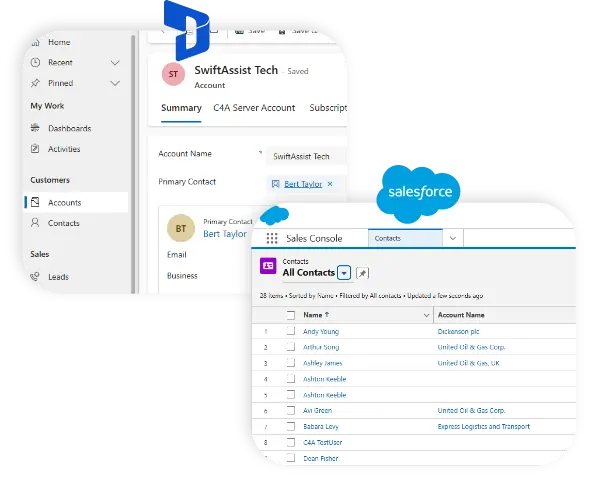
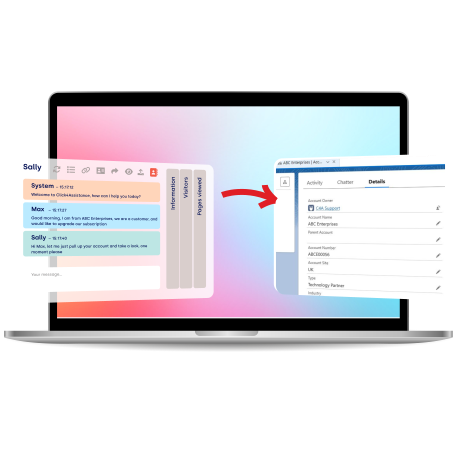
Effortless Integration with Your CRM and CMS Tools

Connect effortlessly with Salesforce, Microsoft Dynamics, or any CRM of your choice. Plus, enjoy ready-to-use plugins for the leading CMS platforms!

What business systems can Click4Assistance integrate with?

The platform is designed to integrate with a wide range of business applications using secure APIs.

Common integrations include:

  • Microsoft Dynamics 365.
  • Salesforce.
  • Customer Relationship Management (CRM) systems.
  • Helpdesk and ITSM platforms.
  • Case Management systems.
  • Housing Management systems.
  • Student Information Systems.
  • Booking and Reservation systems.
  • Payment platforms.
  • Identity Providers.
  • Bespoke applications.

Additional integrations can be developed where required.

Can AI Agents retrieve live business data?

Yes.

Where appropriate connections have been implemented, AI Agents can retrieve information from authorised business systems during a conversation.

Examples include:

  • Account information.
  • Order status.
  • Booking details.
  • Customer records.
  • Appointment availability.
  • Case status.

This allows organisations to combine conversational AI with real-time business information while respecting access controls and permissions.

Can AI Agents update business systems?

Yes.

AI Agents can initiate business processes by passing validated information to connected systems through secure APIs.

Typical examples include:

  • Creating CRM records.
  • Logging support cases.
  • Booking appointments.
  • Updating customer information.
  • Recording service requests.
  • Triggering workflows.

The exact functionality depends on the organisation's connected systems and business rules.

Can Click4Assistance integrate with Microsoft Dynamics 365?

Yes.

Click4Assistance integrates with Microsoft Dynamics 365 to support customer service, sales and operational workflows.

Typical integration scenarios include:

  • Contact lookups.
  • Case creation.
  • Activity logging.
  • Lead creation.
  • Opportunity management.
  • Customer record updates.

This enables advisors and AI Agents to work with customer information without leaving the Click4Assistance platform.

Can Click4Assistance integrate with Salesforce?

Yes.

The platform supports integration with Salesforce through secure APIs.

Typical use cases include:

  • Creating Cases.
  • Retrieving Contact records.
  • Updating customer information.
  • Creating Leads.
  • Logging conversations.
  • Supporting sales and service workflows.

The available functionality depends on the organisation's Salesforce configuration.

Can organisations integrate bespoke applications?

Yes.

Many organisations operate specialist or internally developed applications.

Click4Assistance provides secure APIs that enable bespoke connections without requiring organisations to replace existing systems.

This protects previous technology investments while extending digital customer engagement capabilities.

Can APIs automate business processes?

Yes.

APIs enable organisations to automate repetitive tasks and reduce manual administration.

Examples include:

  • Creating support tickets.
  • Sending confirmation emails.
  • Updating CRM records.
  • Triggering approval workflows.
  • Booking appointments.
  • Recording enquiries.

Automation improves efficiency while helping ensure information remains consistent across systems.

Can AI Agents authenticate users?

Yes.

Where appropriate authentication processes have been implemented, AI Agents can guide users through secure verification before accessing customer-specific information.

Authentication requirements are determined by each organisation's security policies and the systems being connected.

Can Click4Assistance support Single Sign-On integrations?

Yes.

The platform supports Single Sign-On using enterprise identity providers such as Microsoft Entra ID and Okta.

This enables organisations to centralise user authentication, simplify account management and apply existing security policies.

Can Click4Assistance integrate with payment systems?

Yes.

Where required, the platform can integrate with authorised payment systems to support customer journeys involving payments, account settlement or transaction processing.

Integration requirements depend on the payment provider and the organisation's security and compliance requirements.

Can AI trigger multiple business systems?

Yes.

A single customer conversation can initiate interactions with multiple authorised business systems.

For example, an AI Agent might:

  • Verify the customer.
  • Retrieve account information.
  • Book an appointment.
  • Update the CRM.
  • Send a confirmation email.

This enables complex business workflows to be completed through one conversational experience.

How are integrations secured?

Integrations use secure authentication and authorisation mechanisms appropriate to the connected systems.

Organisations determine which data can be exchanged, which systems can be accessed and the permissions granted to AI Agents or advisors.

Security should always align with organisational governance and information security policies.

Can integrations improve customer experience?

Yes.

Connecting customer engagement with existing business systems reduces the need for customers to repeat information, speeds up service delivery and enables more personalised interactions.

This creates a smoother customer journey while improving operational efficiency.

Best practice for system integrations

Successful integrations begin with clearly defined business objectives rather than technical implementation alone.

Recommended practices include:

  • Integrate only where it adds measurable value.
  • Use secure, documented APIs.
  • Validate information before updating business systems.
  • Apply the principle of least privilege.
  • Test integrations thoroughly before production.
  • Monitor integrations and review performance regularly.

Well-designed integrations enable organisations to connect conversational AI with existing business processes while maintaining security, reliability and governance.

See Click4Assistance in Action

Schedule a demo with our experts and explore the power of live chat and AI-driven engagement tools tailored to your business.