











How to Create a Chatbot for Your Website or Business
Create a chatbot for your website, business or customer service team without coding. Learn how to create conversation paths, capture enquiries and offer automated support using Click4Assistance Coni.

Creating a chatbot allows businesses to automate routine conversations, answer common questions and collect information from website visitors. With a no-code chatbot builder, you can configure how customers interact with the chatbot without having to develop the software yourself.
A chatbot can serve different purposes depending on your organisation's requirements. For example, you might create a chatbot for your business website to collect sales enquiries, guide visitors towards relevant services or assist customers with frequently asked questions.
Click4Assistance offers Coni, a rule-based chatbot that uses predefined conversation paths, selectable options and information collection fields. Businesses can configure these interactions to support customer journeys without requiring programming knowledge.
This guide explains how to create a chatbot, what to consider when building one for a website or business, and how to design conversations for customer service and support.
Table of Contents
- What Is a Chatbot and How Can You Create One?
- How to Create a Chatbot: Step-by-Step Guide
- Create a Chatbot for Your Website
- Create a Chatbot for Your Business
- Create a Chatbot for Customer Service and Support
- Features to Look for in a Chatbot Builder
- Benefits of Creating a Chatbot
- Chatbot Examples Across Different Industries
- How to Test, Launch and Improve Your Chatbot
- Frequently Asked Questions About Creating a Chatbot
- Create Your Chatbot with Click4Assistance
What Is a Chatbot and How Can You Create One?
A chatbot is a software application designed to interact with users through automated conversations. Some chatbots follow predefined rules and selectable options, while AI-powered systems can interpret questions written in natural language and generate responses.
Creating a rule-based chatbot involves deciding what the chatbot should help customers with, designing conversation paths and configuring the information it should collect or display.
Using a no-code chatbot builder, businesses can create structured conversations without writing software code. For example, a customer could select whether they need product information, customer support or assistance with an existing enquiry. The chatbot can then present the appropriate options or request further details.
Click4Assistance Coni allows businesses to create these types of guided interactions. For organisations looking for more conversational responses to open-ended questions, Arti, our AI Agent, offers a different approach using approved business information.
See How a Chatbot Works with Coni
Explore how Coni, our rule-based chatbot, guides customers through predefined options and collects information during a conversation. Try our automotive chatbot demonstration to see a structured customer journey in action.
How to Create a Chatbot: Step-by-Step Guide
Creating a chatbot starts with understanding what your customers need and deciding how the chatbot should respond. Whether you're building one for your website, business enquiries or customer support, a structured approach can help you create conversations that are easy to follow.
Here are six steps to help you create a chatbot using a no-code platform.
- Define Your Chatbot's Purpose
Start by identifying what you want your chatbot to achieve. You might want to answer frequently asked questions, collect sales enquiries, help customers find information or guide visitors through a particular service.
Review the enquiries your business already receives and identify those that follow a consistent process. This will help you decide which conversations are suitable for automation.
For example, an estate agent might create a chatbot to collect property preferences and contact details, while a customer service team might use one to direct customers towards the appropriate support department.
- Choose a Suitable Chatbot Builder
Select a chatbot platform that supports the type of conversations you want to create. Consider how conversations are configured, what information can be collected and whether the chatbot can be customised to suit your website.
If your requirements involve predefined options, structured questions and data collection, a rule-based chatbot builder such as Click4Assistance Coni may be suitable.
You should also consider reporting, security, support and any integrations required for your wider business processes.
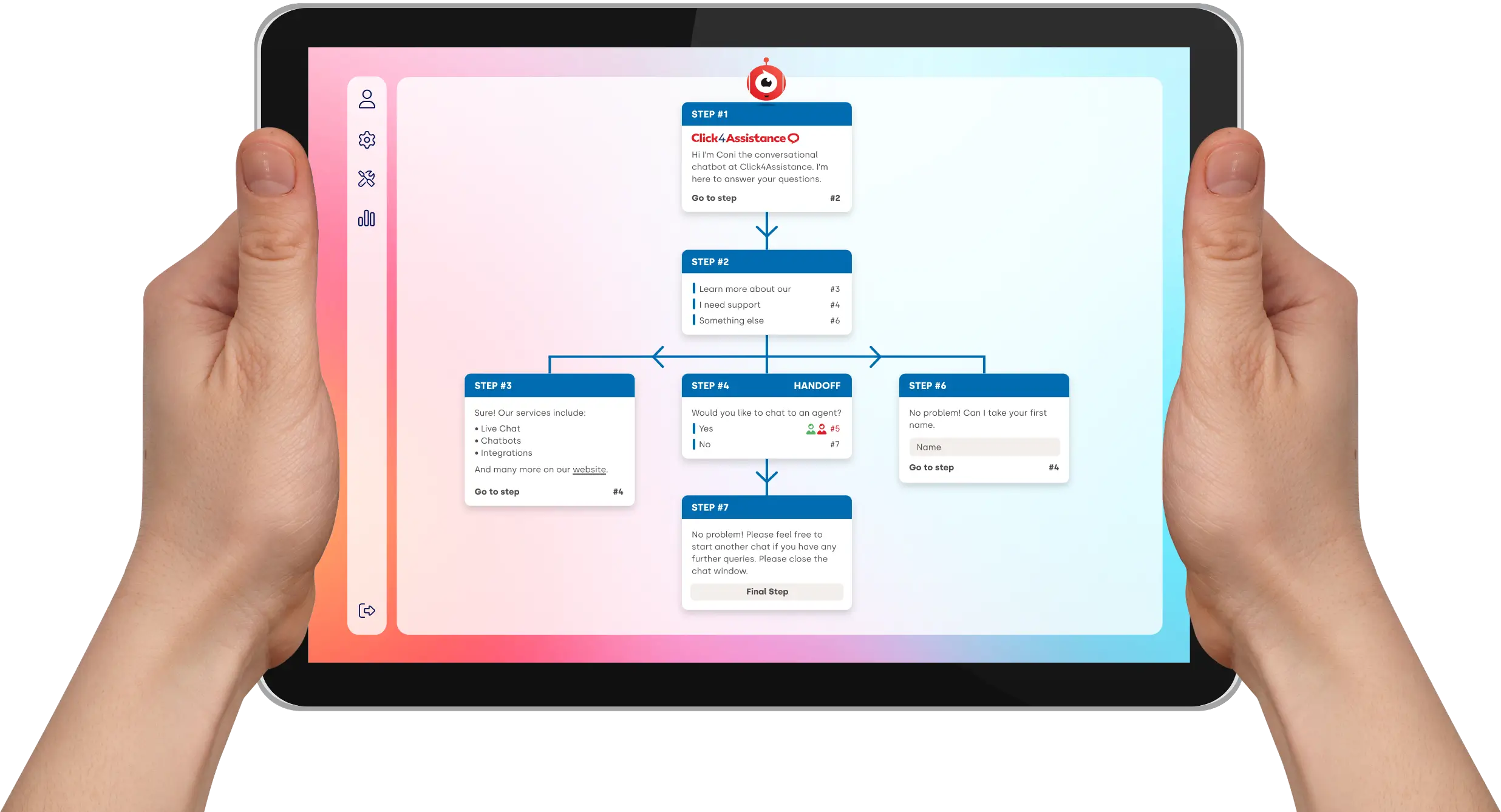
- Design Your Conversation Flow
Plan the journey customers will follow when they interact with your chatbot. Start with a clear welcome message and provide options that reflect the most common reasons for contacting your business.
For example, a chatbot could present three initial options: Sales Enquiry, Customer Support and General Information. Each selection can lead to further questions or information relevant to that enquiry.
Keep the number of steps manageable and make sure customers understand what information is being requested and why.
- Configure Questions, Options and Data Collection
Once you have planned the conversation, configure the messages, selectable options and input fields within your chatbot builder.
With Coni, businesses can create rule-based journeys using predefined options and fields to collect information such as names, contact details and enquiry requirements.
Only request information that is necessary for the intended purpose, and make sure customers can understand how their details will be used.
- Prepare the Chatbot for Your Website
Before making the chatbot available to visitors, consider its appearance, placement and how it fits into your website's existing customer journey.
Use appropriate branding and clear introductory messages so visitors understand what the chatbot can help with. You should also identify how customers can obtain further assistance when their enquiry cannot be handled automatically.
For more detailed website installation guidance, read our guide to adding a chatbot to your website.
- Test Your Chatbot Before Launching
Test each conversation path to confirm that selectable options work as expected, the correct information is displayed and customer details are collected appropriately.
Check the experience on desktop and mobile devices, including what happens when customers provide incomplete information or need assistance outside the predefined conversation.
Once the chatbot is live, review its performance and update conversation paths as your business requirements change.
By following these steps, businesses can create a chatbot that supports a specific purpose, whether that involves generating enquiries, providing information or guiding customers towards further assistance.
Create a Chatbot for Your Website
Creating a chatbot for your website gives visitors a way to ask questions, select the assistance they need and provide information without having to search through multiple pages or wait for a member of staff.
The most effective website chatbots are designed around the actions visitors are likely to take. Rather than adding unnecessary conversation options, businesses should focus on helping customers reach relevant information or complete an enquiry.
Decide What Website Visitors Need
Consider which pages receive the most enquiries and what visitors are trying to achieve. For example, someone browsing a service page may want to request a demonstration, ask about pricing or speak to the appropriate department.
You can create a chatbot journey that presents these options and collects the relevant details.
Create Clear Website Chatbot Conversations
Use straightforward questions and selectable options to guide visitors. For example, an initial message could ask whether the visitor needs product information, technical support or help with an existing account.
Each option can lead to a different conversation path, allowing customers to provide information relevant to their enquiry.
Collect Website Enquiries
A website chatbot can be configured to collect names, contact details and the reason for an enquiry. This can help businesses gather the information required for an employee to respond.
For example, a potential customer requesting information about a service could provide their contact details and select the product they are interested in.
Consider Website Design and Mobile Visitors
Your chatbot should be easy to find and use without interfering with the rest of the website. Consider its position, introductory message, appearance and usability on smaller screens.
Test the chatbot on desktop and mobile devices to make sure buttons, options and input fields are accessible and easy to complete.
For a practical explanation of deployment, see how to add a chatbot to your website.
Create a Chatbot for Your Business
Businesses can create chatbots for a range of purposes, from answering common questions to collecting sales enquiries and directing customers towards the right team. The conversation you build should reflect how your organisation communicates with its customers.
For example, a retailer may want to help customers find information about returns and deliveries, while a housing association may need a chatbot to collect details about repair requests or tenancy enquiries.
How to Create a Chatbot for a Small Business
Small businesses often have limited time and resources available to manage incoming enquiries. Creating a chatbot can provide customers with basic information and allow them to leave relevant details when employees are busy or unavailable.
A small business chatbot does not need to be complicated. It could begin with a small number of options, such as Request a Quote, Ask a Question and Contact Our Team.
Businesses can then develop the conversation journeys as they identify new requirements or receive feedback from customers.
Create Chatbots for Different Departments
Larger organisations may need different chatbot journeys for sales, customer service, general enquiries or specific services.
For example, a customer could select the department they need and then answer questions relevant to that type of enquiry. This helps collect appropriate information before a member of staff reviews the request.
Adapt Your Chatbot to Your Business
When designing a business chatbot, consider your customers, the terminology they use and the information your employees need to handle their enquiries.
Keep conversation options relevant to your services, use clear language and review the chatbot whenever your products, procedures or contact arrangements change.
You can also explore our chatbot solutions for small businesses to learn more about this application.
Create a Chatbot for Customer Service and Support
Creating a chatbot for customer service involves identifying the enquiries customers commonly raise and designing conversation paths that help them find information or request further assistance.
A rule-based customer service chatbot is particularly useful when enquiries can be organised into clear categories, such as account questions, service information, complaints or technical support.
Identify Common Customer Support Enquiries
Review the questions your customer service team receives regularly. Look for enquiries that follow a predictable process or can be addressed using standard information.
For example, a customer support chatbot might provide options for Delivery Information, Returns and Refunds, Product Enquiries or Contact Support.
Build Customer Service Conversation Paths
Design a separate conversation journey for each common support requirement. Ask only the questions needed to understand the enquiry, and avoid requiring customers to navigate unnecessary steps.
With Coni, businesses can configure predefined options and input fields to collect information relevant to a support request.
Provide Access to Human Customer Support
Not every support enquiry can be resolved using a predefined conversation. Customers may need assistance with complex issues, complaints or circumstances requiring personal attention.
When creating a chatbot for customer support, make sure customers can identify how to contact your team or request further assistance when the chatbot cannot address their needs.
Test Real Customer Support Scenarios
Before launching the chatbot, test the conversation using common customer questions and less predictable situations.
Check whether customers can select the correct support category, submit the required information and understand what happens next. Feedback from your customer service team can help identify missing options or unclear instructions.
For a broader look at the technologies used to automate support, read our automated customer service guide.
Features to Look for in a Chatbot Builder
When choosing a platform to create a chatbot, consider the type of conversations you need to build and how easily your team can manage them. Different chatbot builders offer different capabilities, so it is important to select a solution that suits your requirements.
No-Code Conversation Configuration
Look for a platform that allows your team to create and update conversations without needing programming knowledge. For rule-based chatbots, this includes configuring messages, predefined options and conversation paths.
Customer Information Collection
Consider whether the chatbot can collect the details required for your enquiries, such as names, email addresses, contact numbers and the type of assistance requested.
Customisation and Branding
Your chatbot should be presented in a way that is appropriate for your organisation. Review the available options for appearance, introductory messages and how the chatbot is displayed on your website.
Human Support Options
Consider how the chatbot can work alongside your existing customer service arrangements. Customers should know where to obtain further assistance if their enquiry cannot be handled through the automated conversation.
Reporting and Performance Review
Reporting information can help businesses understand how their chatbots are being used. Depending on the platform, this may include conversation volumes, submitted enquiries and information about customer interactions.
Security and Data Protection
If your chatbot collects personal information, review the supplier's security arrangements, data storage, privacy information and relevant GDPR requirements.
When evaluating chatbot builders, prioritise features that support your actual business needs rather than choosing the platform with the longest list of capabilities.
Benefits of Creating a Chatbot
Creating a chatbot can help businesses manage common enquiries, collect customer information and provide more convenient access to support. The results will depend on how the chatbot is configured and which tasks it is designed to handle.
- Provide Information Outside Opening Hours
A chatbot can provide predefined information and collect enquiries when employees are unavailable, allowing visitors to interact with your business outside normal working hours.
- Reduce Repetitive Customer Enquiries
Businesses can create chatbot journeys for common questions, helping customers find information without requiring staff to respond to every routine enquiry individually.
- Collect Relevant Customer Details
Structured conversations can gather information about a customer's requirements, helping businesses understand the enquiry before a member of staff responds.
- Support Consistent Customer Journeys
Rule-based chatbots follow configured conversation paths, helping businesses present consistent options and collect information through a repeatable process.
- Help Employees Focus on Complex Enquiries
Automating suitable conversations can reduce repetitive administrative work, allowing customer service and sales teams to concentrate on enquiries requiring additional attention.
By creating a chatbot around clear customer requirements, businesses can introduce automation gradually and develop their conversations as their needs change.
Chatbot Examples Across Different Industries
The conversations you create will depend on the services your business provides and the information customers need. Here are some examples of how rule-based chatbot journeys could be configured across different industries.
Retail and eCommerce
A retailer could create a chatbot with options for Delivery Information, Returns, Product Enquiries and Contact Customer Support. Customers could select the relevant topic and receive guidance or provide further information.
Healthcare
A healthcare organisation could provide chatbot options for Opening Hours, General Service Information and Contacting the Practice. Enquiries involving symptoms or medical decisions should be directed towards appropriate professional assistance rather than relying on predefined chatbot responses.
Education
A university or college could create a chatbot that guides visitors towards information about Courses, Admissions, Entry Requirements and Student Support. It could also collect contact details from prospective students requesting further information.
Financial Services
A financial services provider could create structured conversations to help customers identify the type of enquiry they have, request general product information or contact the relevant department. Sensitive account information and regulated advice would require appropriate safeguards.
Estate Agents
An estate agent could configure a chatbot to collect property preferences, including location, budget and property type, alongside the visitor's contact details. The information could then support follow-up by the appropriate team.
Travel and Hospitality
A travel or hospitality business could create conversation options for Accommodation Enquiries, Booking Information, Accessibility Questions and General Assistance. The chatbot could provide standard information or collect the details needed for a member of staff to respond.
These examples show how the same chatbot creation approach can be adapted for different industries. The key is to build conversations around the questions and tasks that are most relevant to your customers.
How to Test, Launch and Improve Your Chatbot
Creating your chatbot is only part of the process. Before making it available to customers, businesses should check that each conversation works as expected and that visitors can complete their intended journey.
Test Every Conversation Path
Work through the chatbot as a customer would. Check that each selectable option leads to the correct next step and that any requested information can be entered and submitted.
Check Desktop and Mobile Usability
Test the chatbot on different screen sizes to make sure messages, buttons and input fields are displayed correctly. Visitors should be able to use the chatbot without it obstructing important website content.
Review Customer Information Collection
Check that the chatbot only requests relevant information and that your data collection processes reflect your privacy and data protection requirements.
Make Further Assistance Easy to Find
Ensure customers understand what to do if the chatbot cannot address their enquiry. This may involve displaying contact details or directing them towards the appropriate support arrangements.
Review Performance After Launch
Once the chatbot is available, review customer enquiries, completed conversations and any available feedback. Look for repeated questions, confusing options or points where visitors leave the conversation before completing it.
Regularly reviewing and updating your chatbot can help keep its information accurate and its conversations relevant as your business develops.

Create Chatbots For Different Industries
From healthcare and finance to retail and education, Click4Assistance helps UK organisations create chatbot conversations suited to their customers. Explore how businesses across different sectors use our solutions.
Frequently Asked Questions About Creating a Chatbot
- How do I create a chatbot for my website?
To create a chatbot for your website, identify the enquiries you want it to handle, choose a suitable chatbot builder and design the conversation paths. Configure the questions and options, test the experience and make the chatbot available to website visitors.
- Can I create a chatbot without coding?
Yes. No-code chatbot builders allow businesses to configure automated conversations without writing software code. For example, Click4Assistance Coni uses predefined options, questions and data entry fields to create rule-based chatbot journeys.
- Can I create a chatbot for a small business?
Yes. Small businesses can create chatbots to answer frequently asked questions, collect contact details and provide information outside normal opening hours. Starting with a small number of relevant conversation options can make the chatbot easier to configure and manage.
- How do I create a chatbot for customer service and support?
Start by identifying common customer support enquiries and organising them into suitable categories. Create conversation paths for each requirement, configure the information you need to collect and make sure customers know how to obtain further human assistance when necessary.
- What is the difference between a rule-based chatbot and an AI Agent?
A rule-based chatbot guides customers through predefined options and conversation paths. An AI Agent can interpret questions written in natural language and generate responses using available business knowledge. The most appropriate approach depends on the type of conversations your organisation needs.
- How much does it cost to create a chatbot?
The cost of creating a chatbot depends on the platform, the features required and the complexity of the conversations. Businesses should consider any subscription charges, configuration requirements and ongoing maintenance when comparing solutions.
Create Your Chatbot with Click4Assistance
Creating a chatbot for your website or business can help customers find information, submit enquiries and follow structured support processes. The most effective approach is to start with a clear purpose and create conversations that reflect the needs of your visitors.
With Coni, our rule-based chatbot, businesses can build guided conversations using predefined options and information collection fields without needing to write code.
Whether you want to create a chatbot for a small business, collect website enquiries or provide customer service and support, Coni can be configured around your requirements.
If your organisation needs conversational responses to questions written in natural language, you can also explore Arti, our AI Agent.
Book a demonstration to explore how Click4Assistance could help you create a chatbot for your business.
Thousands Trust Us. Will You?
From live chat to AI-powered chatbots and social integrations, Click4Assistance powers real-time engagement - fully UK hosted and trusted across industries.